How Affiliates Can Track AI Traffic in GA4 After the AI Assistant Channel Update
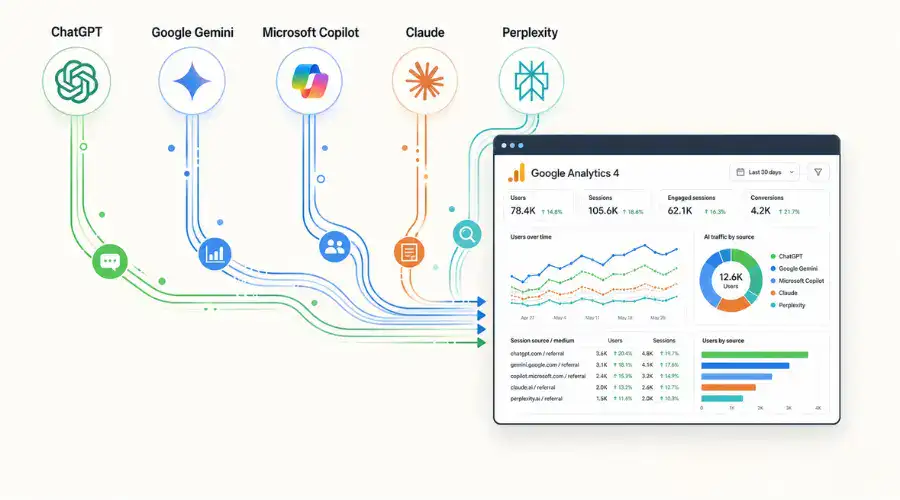
Google has added a native GA4 AI Assistant channel, giving affiliates a cleaner way to measure visits from tools such as ChatGPT, Gemini and Claude. That sound you hear? A thousand regex sheets closing.
For the past year, affiliates and SEO teams had to hack their way around GA4’s Referral bucket. ChatGPT links, Claude citations, Gemini sessions and other chatbot visits often landed beside normal referral traffic, unless someone built a custom channel group and kept updating regex rules every time an AI platform changed how it passed traffic.
Google’s May 13, 2026 update changes that. GA4 now assigns recognized AI assistant visits to a dedicated AI Assistant default channel group when the referrer matches a supported AI tool. Google names ChatGPT, Gemini and Claude as examples in its release notes.
Useful? Yes.
Complete? No.
Key Takeaways: What Affiliates Should Know About the GA4 AI Assistant Channel
- GA4 now gives AI assistant traffic its own channel: Recognized traffic from ChatGPT, Gemini and Claude can appear under AI Assistant in default channel group reports.
- The old regex workaround loses some urgency: Affiliates no longer need to rely only on custom referral filters to separate chatbot traffic from the standard Referral bucket.
- AI traffic can still disappear into Direct: Mobile apps, in-app browsers and copy-pasted links can strip referrer data before GA4 sees the visit.
- Google AI Overviews don’t sit here: Clicks from AI Overviews or AI Mode inside Google Search still fall under the wider Google Search reporting setup, not the AI Assistant channel.
- Affiliates should benchmark now: Track sessions, engagement time, landing pages and conversions before monthly reports start mixing old classifications with the new channel.
What the GA4 AI Assistant Channel Changes for Affiliates
The update works automatically. No new tagging. No custom UTM setup. No late-night regex patching. When GA4 recognizes a click from a supported AI assistant, it updates three traffic source dimensions:
| GA4 Dimension | New Value |
| Session medium | ai-assistant |
| Session default channel group | AI Assistant |
| Session campaign | (ai-assistant) |
Google says the new AI Assistant channel gives site owners a dedicated way to measure and analyze traffic from popular AI assistants. The update places those visits inside Default Channel Group reports, where teams already compare Organic Search, Paid Search, Referral, Direct and other core channels.
For affiliates, that matters because AI traffic no longer has to sit beside partner links, directory referrals, PR links or random source noise. A publisher can now open Traffic Acquisition and see whether AI assistants send users to review pages, comparison pages, coupon content, guides or product-led landing pages. Cleaner reporting. Finally.
It also gives affiliates better evidence when they talk to operators, merchants, affiliate managers or internal stakeholders. Instead of saying “we think AI search is sending traffic,” they can start showing a channel-level view inside GA4. Still, the feature depends on one fragile thing: referrer data. This comes at a crucial time as brands rethink how AI is reshaping influence and attribution in affiliate marketing, where multi-touch journeys are increasingly fragmented.
How to Track AI Traffic in Google Analytics 4 Without Trusting It Blindly
Start inside Reports > Acquisition > Traffic Acquisition.
Set the primary dimension to Session default channel group and look for AI Assistant. If it appears, compare it against Organic Search, Referral and Direct.
Use this quick setup:
- Open GA4.
- Go to Reports.
- Open Acquisition.
- Select Traffic Acquisition.
- Set the primary dimension to Session default channel group.
- Find AI Assistant.
- Compare it with Organic Search, Referral and Direct.
- Track sessions, engaged sessions, average engagement time, key events and conversion rate.
- Save the view in the Library so the team can revisit it.
Understanding these sudden changes highlights the growing role of real-time analytics in affiliate marketing for agile campaign management. Also, add a GA4 annotation or internal reporting note for May 13, 2026. That gives future reports context when AI Assistant traffic appears partway through the month. Without that note, May and June comparisons may look cleaner than they really are.
Then build a custom Exploration. Use Session source / medium and filter for known AI tools that may still leak into Referral. Include terms such as:
- chatgpt
- claude
- gemini
- perplexity
- copilot
- grok
- deepseek
This doesn’t create perfect attribution. GA4 won’t give you that here. The goal is more practical: separate the AI traffic GA4 recognizes from the AI traffic that may still land in Referral or Direct.
| Bucket | What It Tells Affiliates |
| AI Assistant | Traffic GA4 recognizes natively |
| Referral AI sources | AI tools GA4 may not classify yet |
| Direct spikes on AI-cited pages | Possible stripped-referrer traffic |
| Organic Search | Google Search traffic, including AI-led search experiences that don’t fall into AI Assistant |
That gives affiliate teams a workable benchmark before the data gets folded into monthly SEO reports, partner reports or commercial reviews.
Where Chatbot Referral Traffic Still Gets Lost in GA4
The new channel works when GA4 can read a recognized AI assistant referrer. That’s the first catch. AI traffic doesn’t always arrive neatly. Users click inside mobile apps. They open links through in-app browsers. They copy a URL from a chatbot answer, paste it into Chrome, and visit it manually. In those cases, the referrer can disappear before GA4 gets a clean look.
When that happens, the session can still fall into Direct. So, yes, GA4 now tracks chatbot referral traffic better. But it doesn’t identify every AI-assisted visit. It measures visible click-through traffic from supported assistants, not every moment where an AI answer influenced a user.
Three gaps matter most for affiliates:
| Gap | Why It Matters |
| Direct traffic still hides AI visits | Stripped referrers can make AI-influenced sessions look like Direct traffic. |
| Google AI Overviews sit outside this channel | AI Overviews and AI Mode run inside Google Search, so affiliates should still study Organic Search behavior, especially now that Google overhauls search with 24/7 AI agents to change how informational traffic behaves entirely. |
| Google hasn’t published the full recognized referrer list | Search Engine Journal reported that Google named ChatGPT, Gemini and Claude as examples but did not publish every recognized AI assistant referrer. |
That last point needs attention. Perplexity, Grok, DeepSeek, Copilot and smaller AI discovery tools may appear inconsistently depending on how Google recognizes the source and how the user arrives on the site. Some may show under Referral. Some may vanish into Direct. Some may get classified later. This also creates a reporting headache.
Google’s release note confirms the May 13, 2026 update, but it doesn’t clearly say whether older sessions get reclassified retroactively. For affiliates, month-on-month reporting needs a warning label. A May or June report may show “growth” in AI Assistant sessions because GA4 started labeling traffic differently, not because AI tools suddenly sent better visitors. Don’t delete your old AI traffic report yet.
How Affiliates Can Use AI Traffic Data Commercially
The new channel becomes useful when affiliates connect it to outcomes. Sessions alone won’t say much. A chatbot might send fewer visits than Organic Search, but those users may arrive with a clearer problem, a stronger comparison mindset or a specific product already in mind. That changes the reporting conversation.
Affiliates should compare AI Assistant traffic against Organic Search and Referral across:
- landing page type
- engagement time
- scroll depth, where tracked
- key events
- sign-ups
- leads
- sales
- conversion rate
- revenue per session, where available
For content affiliates, the first test should focus on pages that AI tools already like to cite: how-to guides, comparison pages, explainers, review pages, pricing content and problem-led articles. For affiliate managers, the same data can help separate vague “AI visibility” claims from traffic that actually behaves well after the click. That’s the useful part. Not the label itself.
Why AI Traffic Measurement Matters for Affiliate Revenue
The GA4 AI Assistant channel gives affiliates a native line item for traffic from recognized AI tools. It won’t catch everything. It won’t solve attribution. It won’t explain how often a user saw your brand inside an AI answer before clicking. But it gives affiliates a place to start.
That matters because AEO work needs proof. If a publisher invests in content that answers specific questions, earns mentions in AI tools and brings users with stronger intent, they need to look toward the broader top 10 SEO predictions to see how traditional KPIs are shifting.
The practical question changes from “Did AI send traffic?” to “Did AI send users who did something valuable?” Open GA4. Find the channel. Save the report. Compare the behavior. Then keep the old regex backup nearby. Google cleaned up part of the mess, not the whole thing.
Everflow
Connect
Tradedoubler
Connect
1win Partners
Connect
PIN-UP Partners
Connect
Shopnomix, a Nomix Group Company
Connect
V.Partners
Connect
Huffson Group
Connect
Kawaii Partners
Connect
Share your expertise and expand your reach and become a content contributor with us today!
Contact Us To Find Out More